


KFC US - Ordering App
3.28.73K Reviews
App Specs
- Version
- 2026.6.0
- Updated On
- License
- Free
- Downloads
- 5,000,000+
- Developer
- KFC US
- Categories
- Food & Drink
- Platform
- Android, iOS
Screenshots
 Analysis by AppCompare
I judge a restaurant app less by how many buttons it has than by whether it helps me make a sensible choice before I reach the counter. That is the useful idea behind KFC US - Ordering App: it puts the KFC menu and ordering process on a phone, so I can look over a meal and arrange pickup or delivery without starting with a queue. For someone who already knows they want KFC, that can make the trip feel more planned. For someone still deciding where to eat, it is a narrower tool than a general restaurant or delivery app.
The app comes from KFC US and sits in the food-and-drink category. It is free, rated for Everyone, and has an average rating of 3.2 from around 26,000 ratings, alongside roughly 8,200 written reviews. It has been installed over five million times. Those figures suggest it is a familiar way to order, but they are not a promise that every local restaurant offers the same choices or that every order will go smoothly. I would treat it as a practical channel for ordering from KFC, not as a guarantee of a particular experience.
Ordering ahead is the central convenience
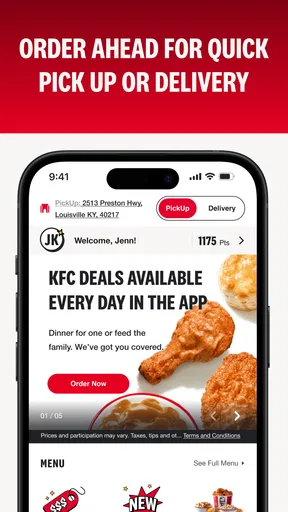
First things first, let’s talk about what you can do with this app. The KFC US - Ordering App is designed to streamline your ordering process. You can easily browse the menu, customize your meal, and place your order for pickup or delivery. It’s like having your own personal KFC in your pocket. No more flipping through paper menus or standing in line. Just a few taps and boom! Your meal is on its way.
That convenience is most meaningful before you set out. I can use the menu to decide what I want, check the shape of the order, and avoid having to work through every choice while other people wait behind me. The app is not a substitute for thinking about timing: an order placed on a phone still depends on the restaurant preparing it, and pickup only helps if I can get there at a useful point in my day. I would place the order when I have a reasonable idea of when I’ll arrive, rather than tapping through it far in advance and assuming the food will be ready exactly when I want it.
Finding a meal without holding up the counter
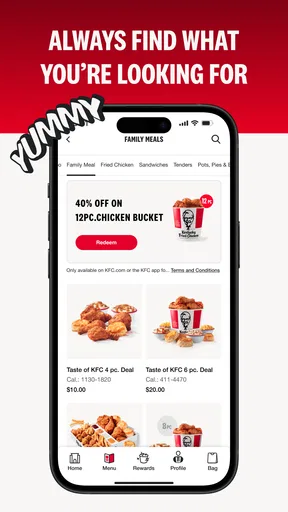
When it comes to the design, the app is pretty straightforward. The interface is clean and intuitive, making it super easy to navigate. The menu is organized into categories, so whether you’re in the mood for a classic bucket or just some crispy tenders, everything is easy to find. Plus, the app remembers your past orders, which is a lifesaver when you’re in a hurry and want to reorder your favorite meal.
That saved-order convenience is also a reason to pause before confirming. A past choice is a useful starting point, not proof that today’s meal, group size, or preferences are the same. I would use a familiar order to get through the menu faster, then review each item and its customizations before submitting. That small check matters particularly when ordering for other people: it gives me a chance to catch a sauce choice or side that made sense last time but not this time.
Browsing ahead can help with a different problem, too: choosing between a single meal and a larger order. Rather than making that decision aloud at the counter, I can look at the available menu categories at my own pace. The app’s value here is not that it makes the food decision for me; it gives me room to make it without a queue behind me. If I need to ask staff about an ingredient or a special request, though, I would not assume that tapping through the standard menu answers that question. The phone is a convenient ordering route, not a replacement for asking the restaurant directly when a detail matters.
Worth Reading Before You Choose

EA SPORTS FC Mobile 26 Is a Bigger Football Game, but It Takes Time

Flipboard Shows What News Apps Must Do Beyond the Feed

Switching to Android Auto Means Rethinking Your Driving Routine

Google Calendar Makes a Crowded Week Easier to Manage

Ludo King Makes the Most of the Minutes Between Plans

Baby Panda World Brings Quick Play to Modern Phones, but Its Game Library Feels Busy
Customization is useful, but check the whole order
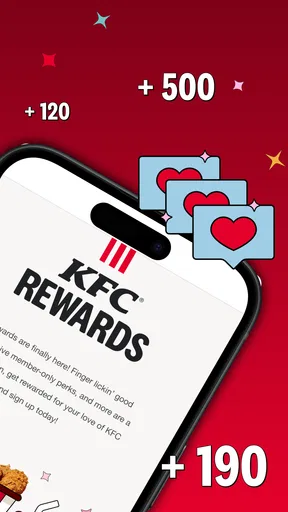
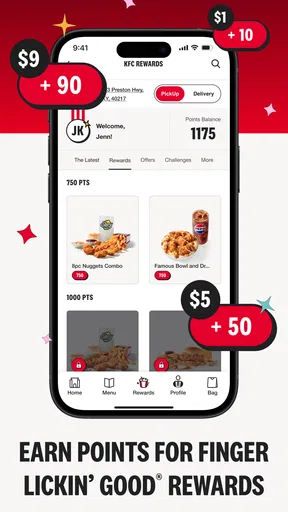
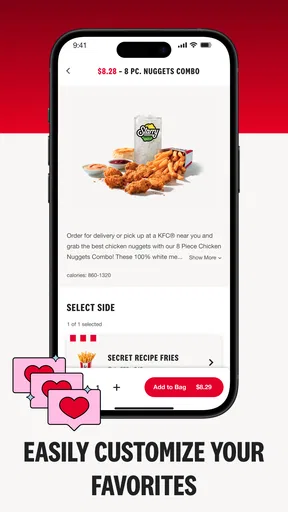
One feature that stands out is the ability to customize your order. You can easily add or remove items, select your preferred sauces, and even adjust the spice level. It’s perfect for those picky eaters in the family. Another neat feature is the loyalty program. Who doesn’t love earning points for free food? Just make sure to sign up and start accumulating those rewards!
For a shared meal, customization is most helpful when I treat each person’s preferences as part of the order rather than as an afterthought. I can take a moment to check the sauces and spice choices for each item, then scan the basket as a whole so I do not mistake one person’s preference for everyone’s. This is a more reliable workflow than rushing through repeated additions, especially when several people are contributing requests. It also helps to decide who is placing the order and collecting it before anyone starts calling out changes.
Rewards can be a pleasant extra for someone who orders from KFC regularly, but I would not let them dictate the meal. The sensible approach is to choose what suits the occasion first, then see whether the loyalty option fits into that plan. If I am only opening the app for an occasional stop, the ordering convenience may matter more than building a habit around rewards. A loyalty feature is only useful when it matches how often I already want the food; it is not a reason by itself to choose a restaurant.
A lunch break is where planning pays off
I’ve personally used the app on my lunch breaks, and it’s a game-changer. You can order ahead and skip the line, which is perfect when you’re racing against the clock. The app also offers delivery options, so you can enjoy your meal without leaving the comfort of your home. Just keep in mind that delivery might not be available in all areas, so double-check before making plans.
Picture a workday when I have a short break and already know I want chicken. I can browse before leaving, make the choices while I still have a moment to think, and head for pickup instead of deciding everything at the counter. The useful part is shifting the menu decision out of the busiest part of the break. I would still leave enough time for travel and collection, and I would avoid treating “order ahead” as a promise that the food will be waiting the instant I arrive.
For a home meal, delivery is the alternative when a trip is inconvenient, but it is worth checking availability before building the evening around it. If delivery does not suit the location or timing, pickup may be the more dependable plan. If neither option works for a particular restaurant, ordering in person or choosing another nearby place is more realistic than repeatedly trying to make the app fit. The choice between pickup and delivery is therefore practical, not just a preference: consider where you are, how soon you need food, and whether you can collect it yourself.
Where it fits among other ways to order
Compared with a general food-delivery app, KFC’s own app is the more direct choice when KFC is already the destination. I can browse its menu and arrange an order without first sorting through restaurants I do not intend to visit. A broader delivery service makes more sense when I am comparing several restaurants, coordinating a mixed order, or choosing based on what is available nearby. The trade-off is focus: this app is for a KFC decision, not a one-stop guide to every meal option.
Ordering at the counter remains a sensible alternative when I am already at the restaurant, want to ask a question before choosing, or have not settled on what to eat. It also avoids relying on a phone workflow when I would rather speak to staff. The app is strongest when I know the destination and want to make the menu and ordering steps more convenient. It is less compelling when the main task is discovering a restaurant, comparing menus across brands, or discussing a request that needs a person’s confirmation.
One practical habit is to choose the ordering route only after checking the situation: if the restaurant is on my way and I have a little time, pickup can reduce counter decisions; if I am staying home, I can check whether delivery is available; if I am unsure about the menu or a request, I can ask in person. That quick decision keeps the app in its proper role. It can make a KFC order easier to organize, but it cannot remove the need to plan around location, appetite, and timing.
Who gets the most from it—and who may not
I would recommend the app most to people who already visit KFC and often repeat familiar orders, as well as anyone who wants to browse at their own pace before collecting food. Families and small groups can benefit from being able to consider individual customizations before submitting the order. Someone who rarely eats KFC, prefers to decide face to face, or wants to compare a wide range of restaurants may get more value from another approach. In particular, a person with a strict dietary concern should not treat menu customization as a substitute for confirming important ingredient or preparation details with the restaurant.
The app is free, and its current version is 2025.12.0; it supports Android 8.0 and later. Those details make it straightforward to consider if the device is compatible, but the real question is whether ordering from KFC this way fits your routine. I would install it for a planned KFC pickup or to browse before a meal, not simply because every restaurant needs its own app. If I only want to find somewhere to eat tonight, a broader option is likely more useful.
My take after weighing the trade-offs
If you’re a fan of KFC and love hassle-free dining, this app is definitely worth a download. It’s all about making life easier while satisfying those cravings. Plus, the ability to customize and earn rewards adds that extra touch that makes dining even more enjoyable.
My recommendation is a little more specific: use it when the KFC choice is already made and the benefit of browsing or ordering ahead is worth having the process on your phone. The app’s focused purpose is a strength for repeat customers, while its limited scope is a reason to skip it if you want to compare many places or prefer talking through every detail. The average rating of 3.2 is a reminder that a familiar ordering idea can still feel uneven to users, so I would keep expectations practical and check the order carefully rather than assuming the app will prevent every mistake.
So, next time you’re craving some delicious KFC, ditch the line and give their app a try. It’s fast, convenient, and oh-so-easy to use. Trust me, once you experience the ease of the KFC US - Ordering App, you’ll wonder how you ever lived without it!
Pros
- User-friendly interface for easy navigation.
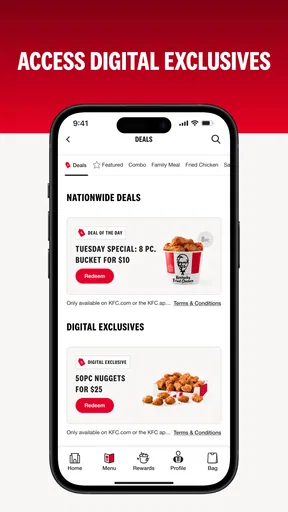
- Quick access to exclusive deals and offers.
- Customizable order options for preferences.
- Fast checkout process for convenience.
- Real-time order tracking for peace of mind.
Cons
- Limited payment methods available.
- Requires stable internet connection.
- Occasional app lag during peak times.
- Limited customization for dietary needs.
- Push notifications can be frequent.
FAQs for KFC US - Ordering App
What features does the KFC US - Ordering App offer?
The KFC US - Ordering App provides a seamless way to order your favorite meals. Features include contactless delivery, in-store or drive-thru pickup, and exclusive offers. Users can customize orders, save favorite meals, and access nutritional information directly from the app, ensuring a personalized dining experience.
Is the KFC US - Ordering App available on both Android and iOS?
Yes, the KFC US - Ordering App is available for both Android and iOS devices. Users can download it from the Google Play Store or the Apple App Store, making it accessible to a wide range of smartphone users who want to enjoy KFC’s offerings conveniently.
How does the app handle payment and security?
The app supports multiple payment methods, including credit and debit cards, and is integrated with secure payment gateways to ensure user data is protected. It uses encryption to safeguard personal and financial information, providing a secure transaction experience for all customers.
Can I track my order using the KFC US - Ordering App?
Yes, the app includes an order tracking feature. Once you place an order, you can monitor its progress from preparation to delivery or pickup. This real-time tracking ensures transparency and helps you plan accordingly, reducing wait times and enhancing convenience.
Are there any exclusive deals or rewards available on the app?
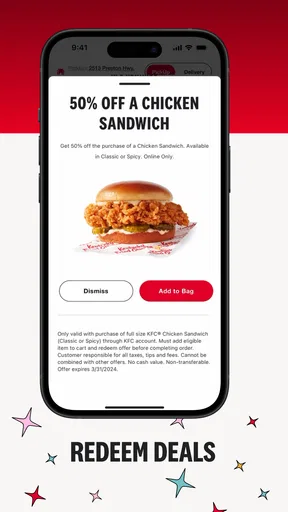
The KFC US - Ordering App frequently offers exclusive deals and promotions that are not available elsewhere. Users can receive personalized offers, earn rewards through loyalty programs, and access special discounts, making it a cost-effective choice for regular KFC customers.


